
Page Series
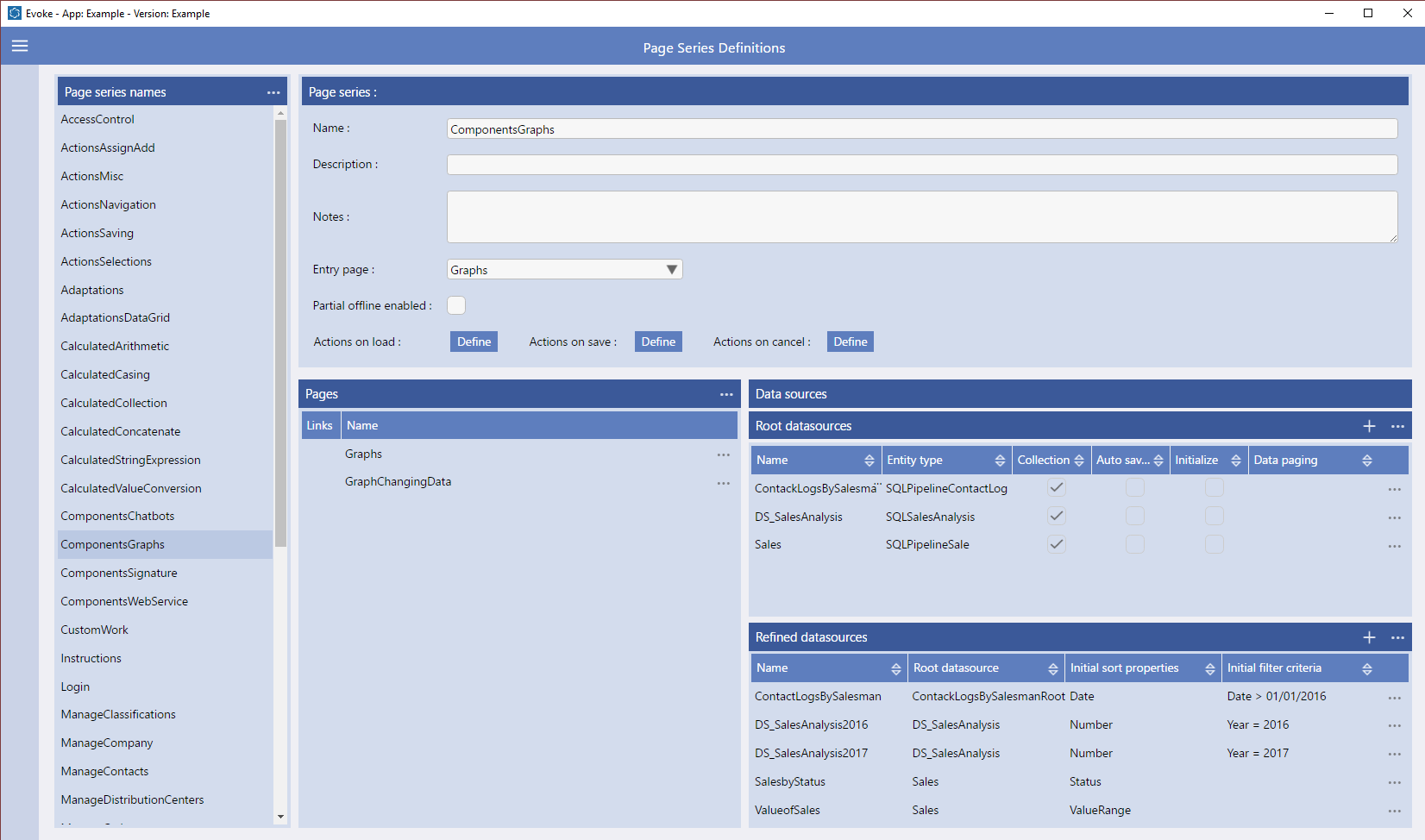
Each Page Series is made up of Pages and, again, you can have as many Pages as you need in a Page Series. The Pages in a Page Series are all the Pages that will be used in the functional area of the App, as linked to the menu item. You can create a new page that is blank or; if the same Page is used elsewhere in the App, then you can "Link" Pages, which means that any changes are reflected in all the linked Pages; or you can import a copy of another Page, so that you can modify a copy of an existing Page to create a new Page.
Select the Entry page for your Page Series from the drop down list of available Pages. This is the Page navigated to when the menu item is clicked that is linked to this Page Series.
Data Sources
Data Sources are the data areas held within the UI, structured by the Entities, that are used by the App Pages and Functionality Actions in the App. Each Page Series has its own set of defined Data Sources.
Populating a Data Source
Data Sources are usually populated with information, from the database, for display and manipulation within the app or as entry forms for new information that is to be written back to the database by the app e.g. a sales order. There are several ways to populate a Data Source, these are explained further in Populating Data Sources.